> For the complete documentation index, see [llms.txt](https://help.semoreport.com/guide/llms.txt). Markdown versions of documentation pages are available by appending `.md` to page URLs; this page is available as [Markdown](https://help.semoreport.com/guide/faqlist/f1/7-4.md).
# 다중사업장은 어떻게 로그인하고 이용하나요?
{% hint style="info" %}
**다중사업장 기능이란?**
* 여러 사업장을 등록해두고, 하나의 계정으로 간편하게 전환, 접속할 수 있는 기능입니다.
* 별도 로그인 없이 사업장 간 빠른 이동이 가능합니다.
{% endhint %}
## 다중사업장 등록 방법
{% hint style="success" %}
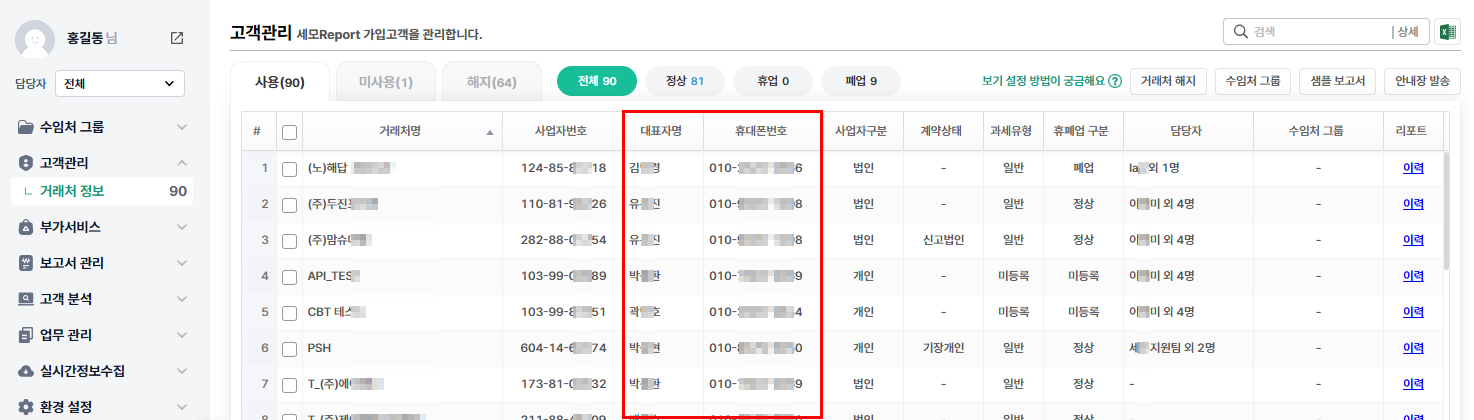
세모리포트 고객관리 메뉴에서 세모리포트를 사용중인 거래처의
**대표자명과 휴대폰번호가 동일한 경우 다중사업장으로 인식**되어요
{% endhint %}
## 사업장 전환 방법
{% hint style="info" %}
* 세모리포트 앱에 로그인 후 \[거래처명] 버튼을 클릭하여 다른 사업장으로 이동할 수 있어요
* 별도 재로그인 없이 즉시 전환되며, 초기 설정한 6자리 비밀번호 그대로 이용할 수 있어요
* 이미 로그인한 상태라면, 더보기 탭 상단의 \[사업장 전환] 버튼을 눌러주세요
{% endhint %}