> For the complete documentation index, see [llms.txt](https://help.semoreport.com/guide/llms.txt). Markdown versions of documentation pages are available by appending `.md` to page URLs; this page is available as [Markdown](https://help.semoreport.com/guide/insight/guide2/howtostart1.md).
# 신청 방법 (공통)
{% stepper %}
{% step %}
## 서비스 신청 경로
세모리포트 좌측 메뉴 \[세모.인사이트] > \[시작하기] 로 진입 후 플러스요금제를 선택해주세요.
{% endstep %}
{% step %}
## 홈페이지 신청 여부 선택
홈페이지 신청여부를 선택해주세요.
### **💡홈페이지 신청 여부에 따라 유형이 달라집니다.**
유형 구분
이런 경우 선택
홈페이지 신청
자사 홈페이지가 없거나, 신규 제작하고 싶은 경우
홈페이지 미신청
(기존 홈페이지에 인사이트만 연동)
자사 홈페이지가 이미 있고, 활용하고 싶은 경우
### 💡\[세모 홈페이지 신청] 유형 안내 사항
{% hint style="danger" %}
1. 세모 홈페이지는 **인사이트 서비스 이용 기간 중에만 제공**됩니다.
2. 서비스 신청 전**, ****도메인 사이트(ex.가비아 등)에서 미리 도메인 구입**을 해주셔야 합니다. \
서비스 신청 시 다음의 정보를 함께 제출해 주세요.
* 홈페이지 주소
* 도메인 사이트
* 도메인 사이트의 아이디, 비밀번호
{% endhint %}
####
{% endstep %}
{% step %}
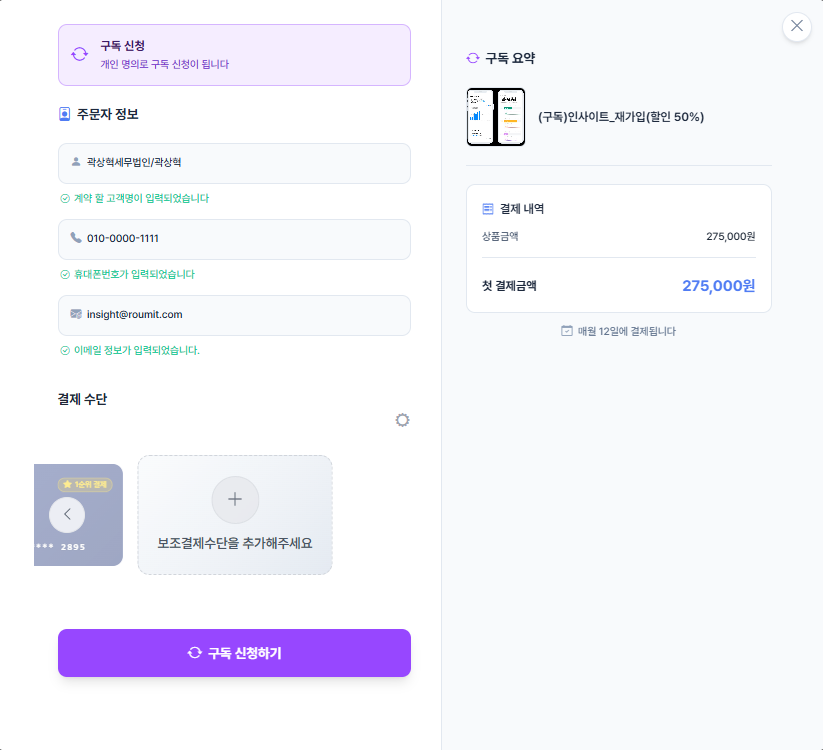
## 결제 수단 등록
매월 정기 결제 시 사용될 카드를 결제 수단으로 등록해 주세요.
####
{% endstep %}
{% step %}
## 서비스 신청 완료
서비스 신청이 완료되었습니다.
🪄 홈페이지 제작을 신청하셨다면, 하단에 나와있는 \[2번]을 클릭하여 이후 단계를 진행해주세요.
#### **👉** [**1) 인사이트만 신청**](https://help.semoreport.com/guide/insight/guide2/howtostart2/insightonly#howtouse1)
#### **👉** [**2) 인사이트+홈페이지 신청**](https://help.semoreport.com/guide/insight/guide2/howtostart2/insightnwebsite#howtouse2)
{% endstep %}
{% endstepper %}
####
신청 중 도움이 필요하신 경우, 고객센터로 연락 부탁드립니다😊
👉 [**고객센터 바로가기**](https://qe398.channel.io/workflows/804734)