> For the complete documentation index, see [llms.txt](https://help.semoreport.com/guide/llms.txt). Markdown versions of documentation pages are available by appending `.md` to page URLs; this page is available as [Markdown](https://help.semoreport.com/guide/skill/3/2.md).
# 2단계: 세모리포트 연동 절차
## 💡신청절차 안내
{% hint style="info" %}
1단계 위멤버스 연동 절차를 완료해야\
세무사무소설정 메뉴가 보여요
{% endhint %}
## STEP 1. 카카오채널 URL 확인
{% hint style="info" %}
세무사무소의 카카오채널 URL을 확인해 주세요
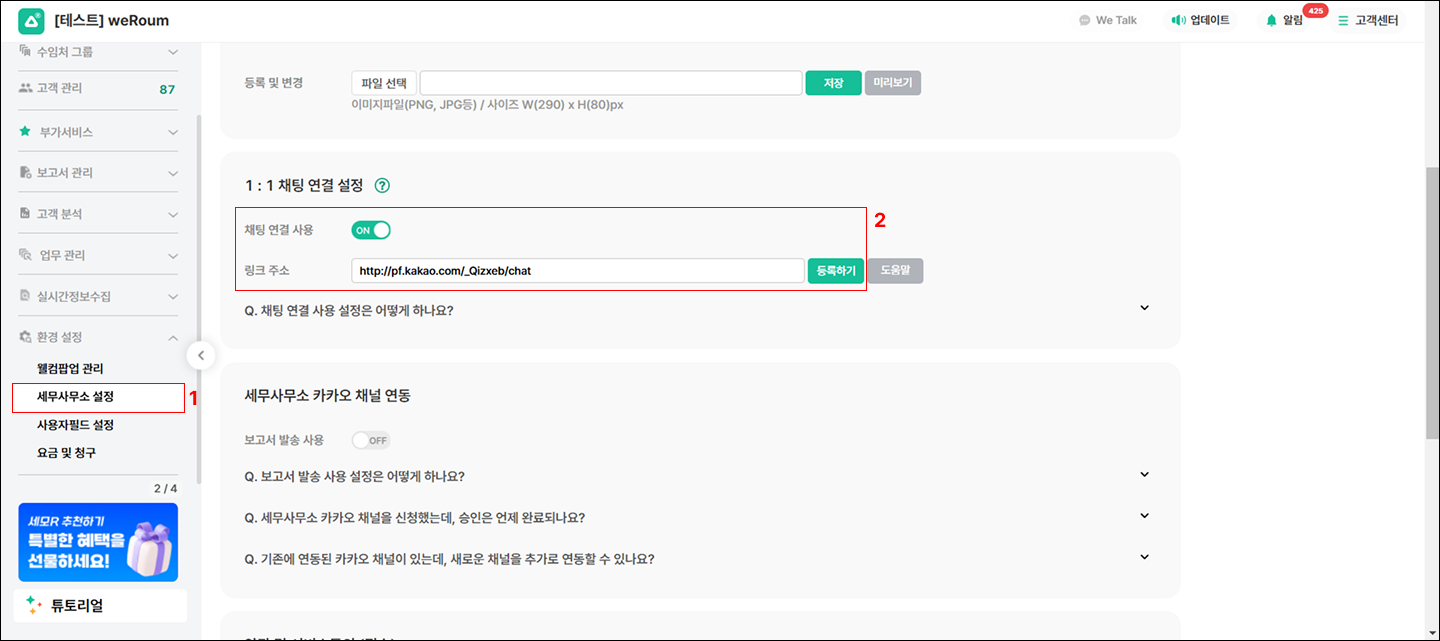
1. 카카오비지니스 > 프로필 설정 클릭
2. 채팅 URL 확인
{% endhint %}
## STEP 2. 세무사무소URL 등록
{% hint style="info" %}
카카오비즈니스에서 확인한 URL을 \
**세모리포트 > 세무사무소 설정에서 등록**해 주세요
{% endhint %}
{% hint style="danger" %}
세무사무소 카카오채널 메뉴가 보이지 않는다면 \
1단계가 완료되었는지 확인해 주세요
{% endhint %}
## STEP 3. 카카오채널 연결 완료
{% hint style="info" %}
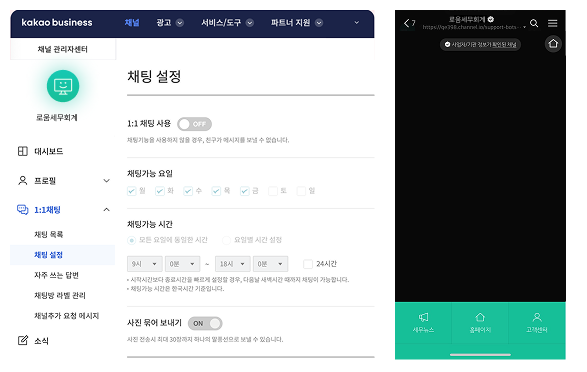
**1:1 채팅 사용 토글 OFF**
Q : 카카오 비즈니스 채널 내, 1:1 채팅 사용 토글을 OFF로 설정하면 어떻게 되나요? \
A : 거래처 대표님이 세무사무소 카카오 채널로 대화를 요청할 수 없어요
{% endhint %}
세무사무소 카카오 채널로 문의 불가능
{% hint style="info" %}
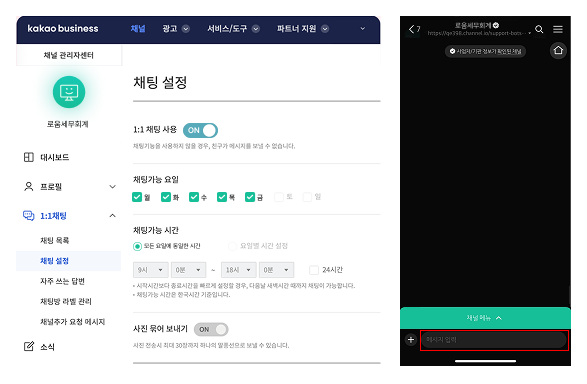
**1:1 채팅 사용 토글 ON**
Q : 카카오 비즈니스 채널 내, 1:1 채팅 사용 토글을 ON으로 설정하면 어떻게 되나요? \
A : 설정한 URL에 따라서 거래처 대표님이 세무사무소 카카오채널로 대화를 요청할 수 있어요 !
{% endhint %}
세무사무소 카카오 채널로 문의 가능
***
## biz포인트 차감 안내
{% hint style="success" %}
* 카카오 비즈니스 메세지는 건당 18 biz포인트가 차감돼요 \
(추가 연락처가 등록된 경우, 인당 18 biz포인트 차감) \
\- 차감 : 가입메세지 발송, 보고서 발송\
\- 미차감 : 고객과 채팅 및 소통
{% endhint %}
### [Biz포인트 내역조회 도움말 보기](https://help.semoreport.com/guide/skill/3/biz#biz-1)👈